 Seyare
Dolphin Anty Proxy Setup: Complete Guide
Dolphin Anty is a modern anti-detect browser designed to safely manage multiple accounts simultaneously. Proper proxy configuration is essential for maximum security, anonymity, and stable performance.

Expert tip: Correct proxy setup is not just about anonymity—it protects your accounts from bans and ensures smooth operation for marketing and automation campaigns.
Using Seyare proxies with Dolphin Anty provides stable connections, unique IPs for each profile, and full browser compatibility.
Why You Need Proxies in Dolphin Anty
Proxies in Dolphin Anty provide several key benefits:
- Anonymity and Security – Each profile uses a unique IP, preventing digital fingerprint overlap.
- Ban Protection – Unique IPs combined with anti-detect profiles reduce the risk of account suspension.
- Multi-account Management – Easily manage dozens of profiles from a single device for marketing and automation.
Technical benefits of Seyare proxies for Dolphin Anty:
| Benefit | How It Helps |
|---|---|
| Unique IP per profile | Protects against blocks and anti-fraud triggers |
| Automatic IP rotation | Switch profiles quickly without manual setup |
| Bulk proxy import | Saves time when managing many profiles |
| Full compatibility | Stable operation across social media and ad platforms |
Preparing for Proxy Setup
Before configuring your proxies:
- Make sure you have Seyare proxies in SOCKS5 or HTTP format.
- Your Dolphin Anty profiles are ready for proxy assignment.
- Know the correct proxy link format for proper connection.
💡 Pro tip: Use a separate proxy for each profile to maintain stability and avoid bans.
Step-by-Step Proxy Setup in Dolphin Anty
Step 1: Choose the Correct Proxy Format
Dolphin Anty requires a specific proxy link format. Select the proper format in the proxy settings and save it.
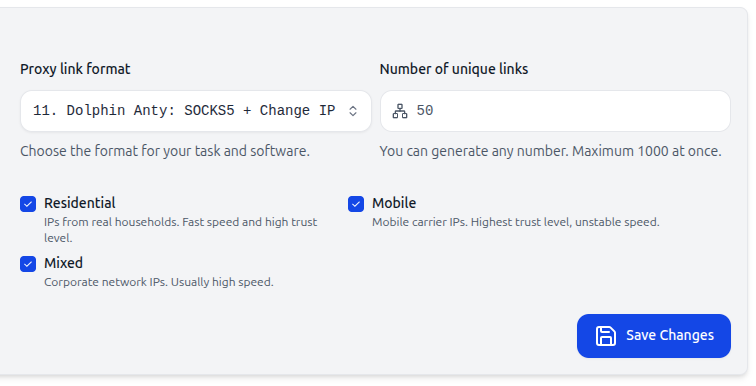
Format example:
socks5://login:password@host:port:name[change-ip-url]
❗ Important: Incorrect formatting will cause connection errors and affect profile performance.
Step 2: Add Your Proxy
- Go to Proxies in the Dolphin Anty menu.
- Click Add Proxy.
- Paste your proxy link and save it.

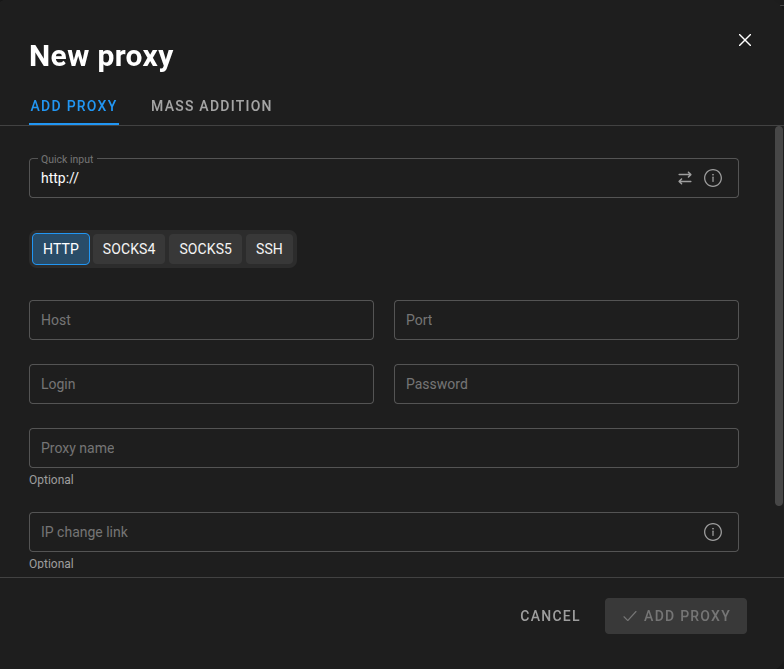
💡 Pro tip: Change the outgoing IP directly from the profile page if needed.
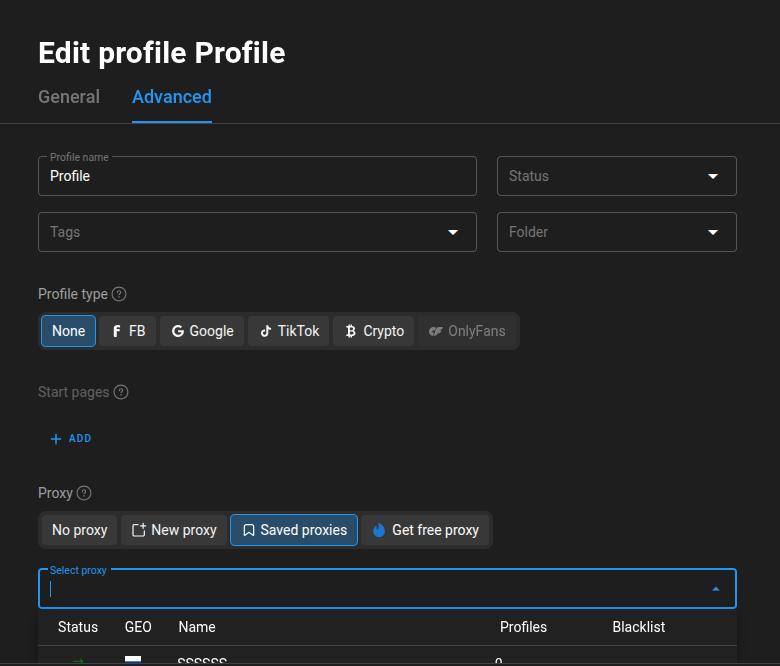
Step 3: Assign Proxy to Profile
- Select a profile and click three dots next to it.
- Go to Saved Proxies.
- Choose the proxy and save.
Step 4: Launch Profile with Proxy
- Click Start next to the profile.
- The profile will open using the assigned proxy and unique fingerprint.

💡 Pro tip: If the profile is slow, try changing the outgoing IP for faster performance.
Advanced Tips for Professionals
- Bulk Proxy Import: Generate hundreds of proxies at once using the Seyare proxy manager.
- Automatic IP Rotation: Enable IP rotation if you need dynamic outgoing IPs.
- Proxy Speed Check: If a proxy is slow, simply change the IP; most connection issues are resolved this way.
Advantages of Using Seyare Proxies with Dolphin Anty
- Full compatibility with all anti-detect features.
- One-click IP rotation for profiles.
- Bulk proxy import for large-scale management.
- Reliable protection against account bans.
- Stable operation across all platforms and networks.
Conclusion
Proper proxy setup in Dolphin Anty allows you to:
- Safely manage multiple accounts.
- Automate marketing and ad campaigns.
- Scale accounts efficiently.
- Protect profiles and sensitive data.
Expert advice: Use Seyare proxies optimized for Dolphin Anty for guaranteed reliability, stability, and smooth operation without blocks.
Ready to test with real IPs?
Register now to get immediate access to our proxy pools.